
If you’ve noticed that blank draft posts are suddenly appearing in your dashboard after a user submits a form, don’t worry! This is a common issue that usually happens when there is a mix-up with the types of fields being used inside the form builder.
Here is a quick breakdown of why this happens and how you can easily prevent it.
The Cause: Understanding Your Form Field Types
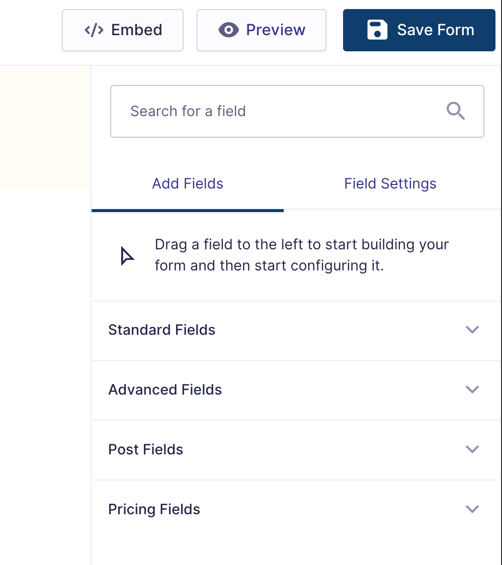
Our form builder offers four distinct types of fields, each designed for a different purpose:
- Standard Fields: The go-to fields for everyday forms (like contact forms, feedback surveys, or sign-ups) where you just want to collect information.
- Advanced Fields: Fields meant for specific data types like email addresses, phone numbers, or file uploads.
- Pricing Fields: Used specifically for calculating totals and handling payments.
- Post Fields: Specialized fields designed only for forms that are intended to automatically generate website content on your site (such as user-submitted classifieds or obituaries pages).
Where the Confusion Happens
This issue occurs when a Post Field is accidentally inserted into a standard form instead of a Standard Field.
Because Post Fields are built to automatically generate posts in the background, placing even one of them into a regular form triggers the system to create a post. However, because the form isn't actually set up to publish an article, it simply creates a random, blank draft in your dashboard every time a user hits submit.
The Solution: How to Fix and Prevent This
If your form is just meant to collect information and is not supposed to create a public website post, you'll want to ensure you are only using Standard Fields (or Advanced/Pricing fields where appropriate) and completely avoid any fields located under the "Post Fields" section.
Our Top Recommendation: Duplicate a Working Form
The easiest way to avoid accidentally selecting the wrong field type or building a form incorrectly is to avoid starting from scratch.
Instead, we recommend duplicating an existing form on your site that you already know works perfectly. Once duplicated, you can safely swap out or edit the standard text fields to fit your new form's purpose. This keeps the correct structure intact and prevents unwanted drafts from cluttering your dashboard!