
If you want to change the prices of your donations or products on your Indiegraf site, you can manage everything directly from your dashboard.
Here is a simple guide on how to update your pricing and how it affects your new and existing donors.
How to Update Your Prices
You do not need to log into Stripe to change your rates. Your Indie Pay system handles the syncing automatically!
- Log into your Indiegraf dashboard.
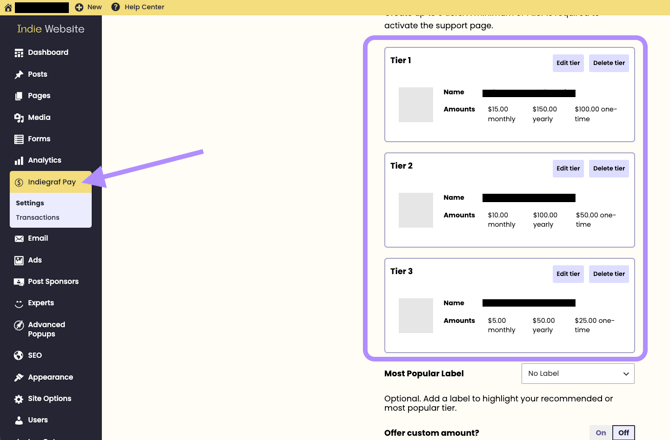
- Navigate to Main Menu > Indie Pay.
- Make your desired pricing changes directly within the Indie Pay plugin.
- Save your changes.
Note: There is no need to do anything on Stripe. Your new prices will automatically sync and update in your Stripe account.
How Price Changes Affect Your Donors
Before you update your prices, it is important to know how this impacts your audience:
- New Donors: Once you save your changes, the updated prices will be live immediately. New supporters will only see and choose from your new pricing tiers; the old prices will no longer be visible to them.
- Existing/Old Donors: Your existing recurring donors and subscribers will maintain their original donation prices. Their ongoing payments will not be altered or updated to the new rates.
Need extra help?
If you run into any issues or have questions about restructuring your pricing tiers, please reach out to our support team at support@indiegraf.com