
Why Use the Campaign Builder?
Campaign URLs can be created manually, but small mistakes—like misspelling a parameter—can prevent tracking from working correctly. The Campaign Builder simplifies this process by automatically generating properly formatted URLs.
Even if you create campaign links through external platforms like email marketing or advertising tools, Independent Analytics can still track them.
Product Demo Video:
How to Create a Campaign URL
-
Log in to your Indiegraf Website.
-
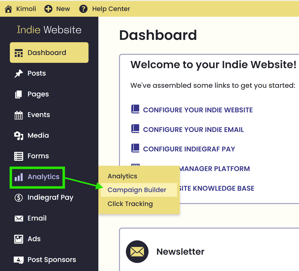
Hover over Analytics in your Indie menu.
-
Click Campaign Builder.
-
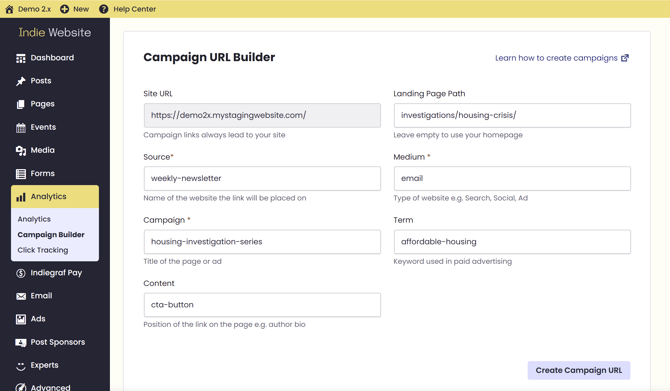
Enter the required campaign details - Source, Medium, and Campaign - and optional parameters if needed.
-
Click Create Campaign URL.
-
Copy and use your new campaign link.
Breakdown of generated example URL components
https://demo2x.mystagingwebsite.com/investigations/housing-crisis/?utm_source=weekly-newsletter&utm_medium=email&utm_campaign=housing-investigation-series&utm_term=affordable-housing&utm_content=cta-button
| Field | What It’s For | URL Example |
|---|---|---|
|
Landing Page Path (optional) |
The page visitors land on when they click the campaign link. Enter the path only (not the full URL). | investigations/housing-crisis/ |
|
Source (required) |
Identifies where the traffic originates. Often the platform, publication, or distribution channel.
|
weekly-newsletter |
|
Medium (required) |
Describes the type of channel used to distribute the link. socialeditorialsyndicationreferral |
email |
|
Campaign (optional) |
Identifies the specific story, series, or initiative being promoted. Use consistent naming to avoid fragmented reporting. | housing-investigation-series |
|
Term (optional) |
Primarily used for paid campaigns to track keywords or targeting criteria. Less common in editorial workflows. | affordable-housing |
|
Content (optional) |
Differentiates multiple links within the same campaign (useful for newsletters and page layout testing). | cta-button |
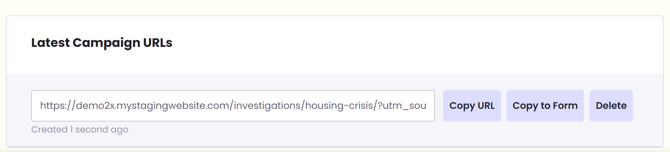
After creating a link, it will also appear in your recent campaign URLs list for quick reuse.
What Happens After You Create Campaign URLs?
Once visitors click your campaign links, Independent Analytics tracks the traffic automatically. You can then review performance in the Campaigns report to analyze traffic sources and campaign effectiveness.
Example 1: Newsletter Traffic to a Feature Story
Scenario:
You want to track how much traffic a long-form investigation gets from your weekly newsletter to figure out how effectively newsletter features perform. This could shape your newsletter product as you adjust to
| Use Case | Landing Page Path | Source | Medium | Campaign |
|---|---|---|---|---|
| Newsletter → Feature Story | investigations/housing-crisis/ |
weekly-newsletter |
email |
housing-investigation-launch |
Example 2: Social Media Distribution of Breaking News
Scenario:
You’re posting a breaking news story to multiple social platforms and want to compare performance.
| Use Case | Landing Page Path | Source | Medium | Campaign |
|---|---|---|---|---|
| Breaking News on Social | news/city-budget-2026/ |
facebook |
social |
city-council-budget-2026 |
Example 3: Audience Engagement Campaigns (Subscriptions or Donations)
Scenario:
You’re running a subscription drive tied to a journalism sustainability campaign.
| Use Case | Landing Page Path | Source | Medium | Campaign |
|---|---|---|---|---|
| subscription / Donations Drive | support-us/ |
membership-drive-email |
email |
support-local-journalism-2026 |
💡For newsrooms, Source + Medium + Campaign usually provide enough insight for editorial and audience teams. Use Content when testing layout or calls-to-action, and Term mainly for paid distribution or sponsored campaigns.