
To consolidate your categories:
-
In your dashboard, go to Posts > Categories. This will show a list of all categories and let you manage them directly.
-
For categories you want to keep (News, Sports, Features, Opinion), review and ensure they’re set up as parent categories.
-
For Features, you can retain "In Full Bloom" as a subcategory by assigning it a parent category of "Features."
-
For subcategories you want to reassign posts from those subcategories to the main category they should now fall under (e.g., move posts from "High School Sports" into "Sports").
Here are the steps to reassign:
-
Go to Posts > All Posts.
-
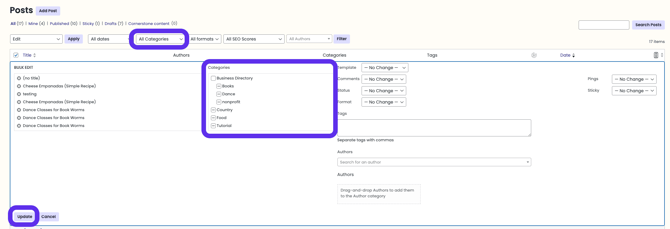
Using the Categories dropdown menu, find a subcategory you wish to remove. This will filter all posts associated with the subcategory.
-
Next, click the checkbox beside the Title column. This will allow you to select all posts associated with the subcategory.
-
From there, click Bulk Action > Edit > Apply. A modal will open up, which will allow you to edit the categories associated with these posts. Use the checkboxes to select the parent category and uncheck the subcategory. Click the Update button to save the changes.
-
Once the posts are moved, go to Categories, then delete the subcategory you no longer need.
-
Repeat the process until only your desired main and subcategories remain.
Remember to keep category names clear and concise for the best reader experience. Optionally, review your editorial calendar to make sure the categories match what you regularly publish. You can always refine further later on.
Be mindful: if changing URLs or slugs, let us know, and we can set up redirects to avoid SEO issues.