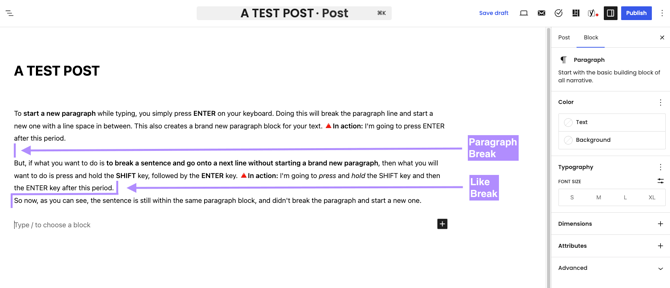
When formatting your articles, you have two ways to move to the next line depending on how you want your text to look. Here is the difference between a Paragraph Break and a Line Break, and how to use them.
1. The Paragraph Break (New Block)
To start a brand new paragraph with a clean space between your text blocks, simply press ENTER on your keyboard.
- 👀 How it looks:
This is the first paragraph. (Pressed ENTER here)
This would be the brand new paragraph block. See how there is a space/gap between the previous paragraph and this one? That is what we call a paragraph break.
2. The Line Break (Same Block)
If you want to drop down to the very next line without starting a brand new paragraph block and without a paragraph break, press and hold SHIFT, then press ENTER.
- 👀 How it looks:
This is the first sentence. (Pressed SHIFT + ENTER here)
As you can see, this sentence is on the next line, but still within the exact same paragraph block. This is what we call a line break.
💡 Quick Tip: Use SHIFT + ENTER when you are writing lists, poetry, or addresses where you want the text close together without large gaps!
Below is an additional visual comparison between a paragraph break and a line break: